- GDK 2610
- GDK 2604
- GDK 2510
October 2026 Microsoft Game Development Kit (GDK) release notes
Introduction
Welcome to the October 2026 Microsoft Game Development Kit with XBOX Extensions (GDKX) and the public GDK release. You can use the GDKX to develop games that can be certified and approved for release on Windows 11 PCs, Windows 10 PCs, XBOX One, and XBOX Series X|S consoles by using a shared codebase. For the GDK, you can develop games that can be certified and approved for release on Windows 11 PCs and Windows 10 PCs.GDKX
- The October 2026 GDKX can be installed side-by-side with GDKXs from November 2019 and later.
- You can download GDKX releases from https://aka.ms/gdkdl.
- The release notes for all GDKX releases are at https://aka.ms/gdkreleasenotes.
GDK
- You can download GDK releases and view their release notes at https://aka.ms/gdk-winget.
About this document
We have organized this document into the following sections.- What’s new
- Release notes:
- Documentation
NOTE: Release notes have a number after their descriptions, such as [12345678]. For GDKX users, this number represents an internal ID that Microsoft uses to track the work and history relating to the item. This number can be useful to your developer account manager if you have questions about a particular release note.
What’s new in the October 2026 Microsoft Game Development Kit
- The GDKX and the GDK are released in two types: Major (focused on features, twice a year) and Updates (focused on fixes, as often as needed by partners).
- To view the full What’s new section, see the online version of What’s new.
- To view release notes for previous versions, for the GDKX, see release notes posts on the GDK forums. For the GDKX and the GDK, see April 2026 release notes and October 2025 release notes.
October 2026 GDK
Notifications
Publisher Content
PC and console games can now ship Publisher-hosted Content, a new package type that lets game publishers host and update content on their own CDNs while the platform continues to manage installation, background download, integrity, and the user experience. For more information, see Publisher Content packages.
GDK layout deprecation
The October 2025 and April 2026 GDK releases include both the simplified and legacy layouts. Beginning with the October 2026 GDK, setup installs only the simplified layout by default. The legacy layout can still be selected as an optional installation, but it is deprecated and is no longer the recommended development path. The legacy layout will no longer be supported and will be removed from the installer starting with the April 2027 GDK release.
GDK Setup
In GDK setup, the default selection for the Install legacy layout directories question has changed from Yes to No.
If you need legacy layouts for compatibility reasons, change the selection to Yes or use the /includelegacylayout switch when installing in silent mode.
The legacy layouts will no longer be supported and will be removed from the installer starting with the April 2027 GDK release. [64072906]
The following screenshot shows the updated setup screen.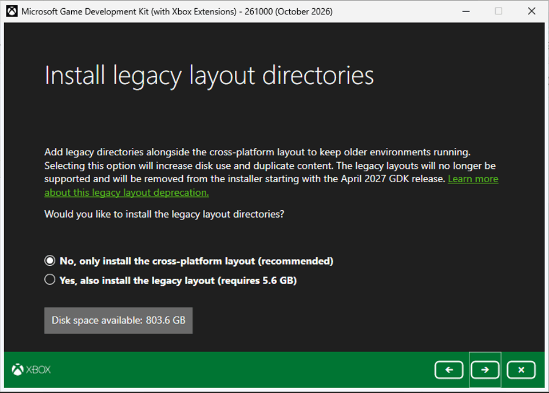
Issue fixes
XblPCSandbox
Fixed an issue that causedxblpcsandbox.exeto fail with error code0x80070520(ERROR_NO_SUCH_LOGON_SESSION) when elevating from a normal user account. [63442452]
Visual Studio
Visual Studio Dynamic Debugging and Run-from-PC (RfPC) Fixed an issue where Dynamic Debugging was not supported when Run-from-PC was selected as the deploy mode. This change also upgrades the remote debugger to Visual Studio 2026 with 100% backward compatibility for Visual Studio 2022. When using Visual Studio 2022 with Dynamic Debugging, Debug > Options > Load Symbols In External Process must be unchecked or the debugging session will hang. [63663764]
Removed the deprecated VS Extension Libraries property page from GDK projects. [64151635]
Developer Tools
Fixed an issue that caused XrfsSvc.exe /paths:del=PATH to delete the entire list of paths instead of the specified path. [63925713]
Gaming Services
Fixed an issue that caused an unresolved variable%GAMING_SERVICES_VERSION%to appear inMicrosoft GDK\<edition>\Windows\Redist\InstallGamingServicesBundle.ps1. The correct Gaming Services version now appears in this file. [63999992]
Documentation
Offline documentation for the October 2026 release of the GDKX is installed on your development PC by the GDKX Setup program. After running Setup, the Help file for the GDKX (gdk.chm) is inC:\Program Files (x86)\Microsoft GDK\Documentation.
- The online GDKX and GDK documentation is at Game Development Kit (GDK) documentation.
April 2026 Microsoft Game Development Kit (GDK) release notes
Introduction
Welcome to the April 2026 Microsoft Game Development Kit with XBOX Extensions (GDKX) and the public GDK release. You can use the GDKX to develop games that can be certified and approved for release on Windows 11 PCs, Windows 10 PCs, XBOX One, and XBOX Series X|S consoles by using a shared codebase. For the GDK, you can develop games that can be certified and approved for release on Windows 11 PCs and Windows 10 PCs.GDKX
- The April 2026 GDKX can be installed side-by-side with GDKXs from November 2019 and later.
- You can download GDKX releases from https://aka.ms/gdkdl.
- The release notes for all GDKX releases are at https://aka.ms/gdkreleasenotes.
GDK
- You can download GDK releases and view their release notes at https://aka.ms/gdk-winget.
About this document
We have organized this document into the following sections.- What’s new
- Release notes:
- Known issues
- Documentation
NOTE: Release notes have a number after their descriptions, such as [12345678]. For GDKX users, this number represents an internal ID that Microsoft uses to track the work and history relating to the item. This number can be useful to your developer account manager if you have questions about a particular release note.
What’s new in the April 2026 Microsoft Game Development Kit
- The GDKX and the GDK are released in two types: Major (focused on features, twice a year) and Updates (focused on fixes, as often as needed by partners).
- To view the full What’s new section, see the online version of What’s new.
- To view release notes for previous versions, for the GDKX, see release notes posts on the GDK forums. For the GDKX and the GDK, you can view the release notes in the online documentation at GDK release notes.
April 2026 GDK Update 5
Issue fixes
PlayFab Party
Updated PlayFab Party to v1.10.26, which includes the following fixes:[63883777]
- Fixed a possible crash while destroying a
PartyEndpoint.- Fixed handling of empty, malformed, or incomplete responses from
/MultiplayerServer/GetCognitiveServicesToken. Party now reports the request as failed instead of possibly crashing.- Fixed a possible crash if direct connectivity setup completed after a remote device left a peer-to-peer network.
System
Fixed a possible title crash inxgameruntime.dll!OnRuntimeDisconnectedwhen large strings are passed toXSpeechSynthesizerCreateStreamFromText. [63860960]
Improved handling of memory pressure when performing read or write game save operations. [63996543]
Improved the error codes returned when a read or write game save operation fails. [63996543]
April 2026 GDK Update 4
Issue fixes
Social Manager
Fixed an issue where the GDK C Thunks DLL didn’t export the Privacy mute-list, block-list, and Social friend-request-count changed-handler functions, so titles calling them silently linked against the XSAPI static library instead of the thunks DLL and ended up with a mismatched runtime. [63776691]
Fixed a stack-overflow crash while populating the Social Manager social graph becausePeoplehubService::DeserializeUserused a 17-KB stack frame holding three redundant copies of eachXblSocialManagerUser. [63776693]
MSIXVC1 (Packaging)
makepkg2 packwithout the/msixvc2option once again works without giving an error about the/usepublisherkeyoption. This issue was introduced in Update 3. [63529609]
Wdapp
Fixed an issue where using wdapp register on a game with both ARM64 and x64 binaries didn’t choose the appropriate binary on ARM64 machines. [63756866]
PIX
Fixed an issue in the PIX timeline where named fences’ arrows weren’t displayed. [63446892]
April 2026 GDK Update 3
Notifications
Publisher Content
PC and console games can now ship Publisher Content, a new package type that lets game publishers host and update content on their own CDNs while the platform continues to manage installation, background download, integrity, and the user experience. Developers declare it in theirMicrosoftGame.config(via the newPublisherContentelement on the base game and thePublisherContentBaseProductfield on the content package) and produce the package with the corresponding newmakepkgparameters. Games can identify the kind of a package returned by existing GDK APIs using the newXPackageGetPackageKind()API, which now reportsXPackageKind::PublisherContentin addition toGameandContent. [63082917]
PlayFab Party
Upgraded the Windows platform toolset used to build the library from v142 to v143. [63294760]
PIX
New CLI tool is available to convert programmatic timing captures: convertpevt.exe. [62666766]
Issue fixes
Clang/LLVM
The XBOX Game OS umbrella libraryxgameplatform.libhas been updated with the following Win32 APIs to support clang/LLVM’s implementation of PGO instrumentation:FlushViewOfFile,VirtualUnlock. Developers using clang/LLVM’s PGO need to also provide link aliases for some legacy POSIX APIs used by clang/LLVM’s implementation to successfully link:[62740693]#pragma comment(linker, "/alternatename:fileno=_fileno") #pragma comment(linker, "/alternatename:getpid=_getpid") #pragma comment(linker, "/alternatename:strdup=_strdup")
PIX
Loading of large caches of external shader PDBs is more reliable and consistent. [63014983]
PIX DirectStorage
Fixed an issue that caused incorrect zooming behavior when navigating from either the Element Details view or the Range Details view in Timing Captures. [62664029]
Fixed an issue that caused the diamond marker that indicates the start of a DirectStorage batch in the Timing Capture timeline to be hard to read when in dark mode. [62664035]
XBOX Manager
Fixed an XBOX Manager crash that can occur while viewing video for a console or a group in the Remote Control tab. [62844048]
PlayFab Game Saves
Fixed minor telemetry reporting issues on Steam Deck where certain diagnostic fields were incorrectly populated during save operations. [62642608]
Disabled the conflict loser upload feature on Steam Deck to match XBOX/GRTS behavior. [62642612]
Fixed an issue where PlayFab Game Saves incorrectly handled missing registry keys, resulting in an initialization error. [62642607]
Social Manager
Fixed an issue where the Social Manager friends list could intermittently remain empty for an entire session (XblSocialManagerDoWorkraised noLocalUserAddedevent) when the initial People Hub friends-list request never completed. The initial request is now recovered automatically, so the social graph populates without requiring a game restart. [63202269]
Fixed an issue where Social Manager returned an incorrect title name and rich presence text for a friend playing a title whose display name contains a hyphen, because the presence string was split on the first hyphen instead of the intended space-hyphen-space separator. [63202289]
PlayFab Party
Fixed audio-manipulation voice streams producing no buffers when the title hadn’t yet configured an audio output. [63294702]
Fixed possible voice loss when transitioning between networks while audio manipulation is active. [63294760]
Fixed missing final speech-to-text transcription when an audio manipulation capture stream is active. [63294760]
Fixed a possible crash on shutdown when the process task queue was deleted before Party finished shutting down. [63294760]
Fixed a possible use-after-free where internal HTTP tracking objects could be deleted before the backing async task completed. [63294760]
Fixed a bug where PlayFab Party would fail to bind to its UDP multiplayer port in some PC environments with misconfigured WMI registries. [63251323]
Publisher Content
Fixed an internal bug in XTaskQueue to prevent an infinite wait during teardown. [63190218]
MSIXVC2
MSIXVC2 creation now succeeds even if the Intelligent Delivery layout.xml has multiple features that use the same image file. [63117723]
MSIXVC2 pack command gracefully ignores the /maxencryptionfragments and /nogameos options (which have no effect on an MSIXVC2) to make it easier to drop into existing build pipelines. [63118134]
The MSIXVC2 pack command now correctly includes files from the source directory that are symbolic links. Previously it incorrectly treated these as 0 length files. [63118309]
April 2026 GDK Update 2
Notifications
Developer tools
The Direct3D 12 Desktop Game (Classic) template for Visual Studio 2019 no longer has ARM64 configurations. Support for targeting ARM64 with Visual Studio 2019 is deprecated. Visual Studio 2022 or later is required. [62468394]
Markdown files available
A .zip file with GDK documentation Markdown files has been added to the GDK installer. Previously, this .zip file was only available as a separate download at https://aka.ms/gdkdl. [62398050]
Issue fixes
Input
Fixed an issue where a potential out-of-memory error occurred when callingGameInputCreatein theNuGetversion ofGameInputon XBOX. [62353092]
PIX
Fixed an issue where PIX incorrectly reported the console mode as Lockhart when opening captures that were taken on Lockhart 40GB. [62490828]
Media
Fixed an issue that caused the H.264 decoder Media Foundation Transform (MFT) to stop responding during destruction when the decoder was created and destroyed without submitting input video samples. [62525251]
System
Fixed a issue in unsigned (local) MSIXVC2 packages that failed to install by using wdapp. [62386086]
April 2026 GDK Update 1
Notifications
XBOX Game Package Manager
Use the latest XBOX Game Package Manager (XGPM) UI release from GitHub when creating and uploading MSIXVC2 packages. This release includes multiple fixes. To download it, go to releases - Microsoft/PackageUploader.
Issue fixes
System
Fixed a memory leak in the XGameActivationAcceptPendingInvite API. [61953160]
Fixed an issue where XLaunchUri failed with URIs longer than 21 characters. [62181431]
Fixed an issue in theXGameInvite.handXGameProtocol.hGDK header files that could cause a C4768 compiler error. [62181564]
MSIXVC2
Fixed various component reliability and performance issues in the preview version of MSIXVC2. [62225080]
Developer tools
Fixed an issue where the MicrosoftGame.config Editor silently failed to save or create new files while reporting success. [62226865]
April 2026 GDK
Notifications
GDK layout deprecation
The October 2025 and April 2026 GDK releases include both the simplified and legacy layouts. Beginning with the October 2026 GDK, setup installs only the simplified layout by default. The legacy layout can still be selected as an optional installation, but it is deprecated and is no longer the recommended development path. The legacy layout will no longer be supported and will be removed from the installer starting with the April 2027 GDK release.
API deprecations
TheXGameActivationAPI has replaced theXGameProtocolandXGameInviteAPIs, providing a single API surface for all game activation scenarios. As a result,XGameProtocolandXGameInviteare now deprecated. Existing implementations will continue to function, but we recommend migrating toXGameActivationfor new development and future compatibility. The following APIs have been deprecated.For more information, see XGameActivation. [61232139]
XGameProtocolRegisterForActivationXGameProtocolUnregisterForActivationXGameInviteRegisterForEventXGameInviteUnregisterForEventXGameInviteRegisterForPendingEventXGameInviteUnregisterForPendingEventXGameInviteAcceptPendingInvite
Developer tools
Mainstream support for Visual Studio 2019 has expired. Extended support continues until April 2029. For more information about Visual Studio 2019 product lifecycle and servicing, see Visual Studio 2019 Product Lifecycle and Servicing. Visual Studio 2019 and the v142 toolset compiler are out of mainstream support as of April 2024 and are only getting security servicing. Support for Visual Studio 2019 integration and use of the v142 platform toolset via Visual Studio 2022/Visual Studio 2026 will be removed in a future release of the GDK. This process will include the removal of theMicrosoft.Xbox.Services.142.GDK.C.liblibrary. For Visual Studio 2022 and Visual Studio 2026, we recommend moving toMicrosoft.Xbox.Services.143.GDK.C.lib, which was added in the April 2026 GDK. [61594513]
Address Sanitizer (ASAN) for XBOX is no longer supported on Visual Studio 2019. [60868415]
Screen captures can now be copied to the clipboard from the XBOX Manager Media Capture tab. [41667882]
PC command-line tools such aswdcapture,wdcapturesession, andxblpcsandboxnow support direct bug feedback submission through the Feedback Hub app. [60250549]
Package Uploader now supports federated credentials. [60771527]
Microsoft Azure PlayFab
PlayFab Multiplayer has been updated to v1.9.0. For details, see PlayFab Multiplayer C++ SDK Release Notes - PlayFab | Microsoft Learn. [61288995]
Microsoft Azure PlayFab Party
PlayFab Party has been updated to v1.10.18. For details, see PlayFab Party Release Notes - PlayFab | Microsoft Learn. [61288995]
Issue Fixes
Fixed an issue that caused the language setting in a non-English command prompt to change to English after running GDK XBOX command-line tools such as xbapp.exe or xbconnect.exe. [59688191]
Fixed an issue where XBOX Game Package Manager didn’t populate the UI with the last selected branch. [60771527]
Known issues
makepkg2: /priorpackage doesn’t generate a compare report for MSIXVC2 packages
Issue:
Inmakepkg2, using the/priorpackageflag when packing MSIXVC2 packages doesn’t generate a compare report. Compare report generation isn’t supported for MSIXVC2 packages in this release. Applies to:Workaround:
- April 2026 GDK
None at this time. Status:
This issue will be fixed in a future GDK update. [61771743]
makepkg2: layout.xml requires DisplayName on all features
Issue:
Inmakepkg2, thelayout.xmlparser requires theDisplayNameattribute on all features, including hidden features where a display name isn’t meaningful. Applies to:Workaround:
- April 2026 GDK
Add a placeholderDisplayNameattribute to any hidden features inlayout.xml. Status:
This issue will be fixed in a future GDK update. [61767246]
makepkg2: /contentid flag fails when ContentId is absent from MicrosoftGame.config
Issue:
Inmakepkg2, using the/contentidflag when noContentIdis specified inMicrosoftGame.configresults in the following error./contentid specified on the command line does not match the ContentId derived from the MicrosoftGame.config file.This behavior differs frommakepkg, which accepted the/contentidvalue directly in this scenario. Applies to:Workaround:
- April 2026 GDK
Use/contentidoverrideinstead of/contentid. Status:
This issue will be fixed in a future GDK update. [61767256]
MSIXVC2 packages can’t be uploaded to Microsoft Partner Center via its web UI
Issue:
The upload of an.msixvcpackage to Partner Center fails if it was built by using the newmakepkg2tools. Applies to:Workaround:
- Partner Center web UI
Use one of the following tools to upload MSIXVC2 packages to Partner Center.Status:
makepkg2upload command:makepkg2 upload /d <content_directory> /branch "<BranchName>" /msixvc2- XBOX Game Package Manager: Download the latest version from https://github.com/microsoft/PackageUploader.
Partner Center will be updated in the coming months to add support for web uploads of MSIXVC2 packages.
XboxPcTray.exe might block MSIXVC2 package uninstall or update
Issue:
XboxPcTray.exesometimes retains a handle to the game’s Content folder, which can prevent uninstall or update operations from completing. Applies to:Workaround:
- April 2026 GDK
Close the XBOX PC Tray app before attempting to uninstall or update. To close it, right-click theXboxPcTrayicon in the system tray, and then select Quit. You can also end theXboxPcTray.exeprocess in Task Manager. Status:
This issue will be fixed in a future GDK update. [61618609]
MSIXVC2 packages can’t be uploaded via Package Uploader
Issue:
Uploading an.msixvcpackage to Partner Center via the Package Uploader command-line tool fails with a 400 (Bad Request) error if the package was built by using themakepkg2tool with the/msixvc2flag. Although MSIXVC and MSIXVC2 packages share the same.msixvcfile extension, MSIXVC2 packages use a different internal format that Package Uploader doesn’t currently support. Applies to:Workaround:
- Package Uploader CLI (PackageUploader.exe)
Use one of the following tools to upload MSIXVC2 packages.Status:
- makepkg2 upload command:
makepkg2 upload /d <content_directory> /branch "<BranchName>" /msixvc2>- XBOX Game Package Manager: Download the latest version from https://github.com/microsoft/PackageUploader.
This issue will be addressed in a future release of Package Uploader.
MSIXVC2 packages in Partner Center appear as 1 byte in size in its UI
Issue:
Partner Center shows an incorrect size for uploaded MSIXVC2 packages. It shows 1 byte, regardless of the package’s size. Applies to:Workaround:
- Partner Center
None at this time. Status:
This issue will be fixed in a future GDK tools update.
Build With/Out Install (BWOI) MSBuild integration for Visual Studio 2026
Issue:
The Build With/Out Install (BWOI) MSBuild integration for Visual Studio 2026 differs slightly from previous releases. In the current releases of Visual Studio 2026, the BWOI implementation must “lock” to a specificVCTargetsPath. The result is that all projects are built with v145 or clang-cl, even if thePlatformToolsetvalues are set to v142 or v143. These older toolsets usually build correctly in standard Visual Studio scenarios. Applies to:Workaround:
- April 2026 GDK
For details about a workaround, see BWOIExample. Status:
The GDK team and the Visual Studio team are working to resolve this issue in a future Visual Studio release. [61855642]
Documentation
Offline documentation for the April 2026 release of the GDKX is installed on your development PC by the GDKX Setup program. After running Setup, the Help file for the GDKX (gdk.chm) is in C:\Program Files (x86)\Microsoft GDK\Documentation.
- The online GDKX and GDK documentation is at Game Development Kit (GDK) documentation.
October 2025 Microsoft Game Development Kit (GDK) release notes
Introduction
Welcome to the October 2025 Microsoft Game Development Kit release. You can use the GDK to develop games that can be certified and approved for release on Windows 11 PCs and Windows 10 PCs.About this document
We have organized this document into the following sections.- What’s new
- Release notes:
- Known issues
- Documentation
What’s new in the October 2025 Microsoft Game Development Kit
- The GDK is released in two types: Major (focused on features, two times a year) and Updates (focused on fixes, as often as needed).
- To view the full What’s New section, see the online version of What’s New.
October 2025 GDK Update 4
Issue fixes
PlayFab Game Saves
Fixed an issue where applying a cloud folder deletion could delete local files that had never been synced, and increased the granularity of upload progress reporting so titles can animate a determinate progress bar during compression. [63666969]
Fixed an issue where failed cloud storage transfers were reported as successful, which could finalize a save with missing data and permanently prevent that player’s saves from syncing on every device. [63475452]
Fixed issues that could cause save data loss during sync, memory corruption when game saves shared a GDK context, and incorrect handling of manifests that failed validation. [63647898]
Fixed an issue where the game save sync progress callback reported a total size of zero, preventing titles from displaying a determinate progress bar. [63529869]
October 2025 GDK Update 3
Notifications
Registration of file type associations
PC games can now register file type associations in MicrosoftGame.Config. When a user opens a file with a registered extension, the game will either be launched or be brought to the foreground. This behavior is enabled through theXGameActivation*APIs (for example,XGameActivationRegisterForEvent()).
Input
Motion-enabled controllers using simple interprocess communication (SIPC) now share the PC sensor-fusion pipeline. Accelerometer and gyroscope scaling, startup gyroscope-bias capture, and still-based drift correction are at parity with PC. As a result, IGameInputReading::GetMotionState returns a gravity-relative orientation with a bounded drift.
PlayFab Game Saves
The ability to preserve and roll back to the discarded game save when choosing between Keep Local or Keep Cloud on Steam Deck has been disabled to match XBOX/Gaming Runtime Services (GRTS) behavior.
Issue fixes
Networking
Fixed an issue where the library might crash after losing a WebSocket connection while it was paused in a debugger.
XBOX services
Fixed an issue where WinHTTP-based HTTP calls could experience instability because of a use-after-free condition in libHttpClient.
Input
Fixed an issue where a potential out-of-memory error occurred when callingGameInputCreatein theNuGetversion ofGameInputon XBOX.
Fixed an issue where input could be lost after resuming a suspended game.
Media
Fixed an issue that caused the H.264 decoder Media Foundation Transform (MFT) to stop responding during destruction when the decoder was created and destroyed without submitting input video samples.
PlayFab Game Saves
Fixed an issue where PFGameSaves incorrectly handled missing registry keys, resulting in an initialization error.
Fixed minor telemetry reporting issues on Steam Deck where certain diagnostic fields were incorrectly populated during save operations.
October 2025 GDK Update 2
Notifications
Microsoft Azure PlayFab Party to v2.2.7 updates
- Changed the
PartyNetwork::CreateEndpointPartyStatusChangeResultbehavior to returnPartyServiceErrorfor transient errors that occur before the token expires, and to returnUserNotAuthorizedonly when the token has actually expired.- Added audio device selection support for XUser-less or in-proc Gaming Runtime Services (GRTS) environments.
- Fixed a potential crash during multinetwork transition scenarios.
PlayFab Party to v1.10.16 updates
- The
PartyNetwork::CreateEndpointPartyStatusChangeResultbehavior has been changed to returnPartyServiceErrorfor transient errors that occur before the token expires, and to returnUserNotAuthorizedonly when the token has actually expired.- Audio device selection support has been added for XUser-less or in-proc Gaming Runtime Services (GRTS) environments.
- A potential crash during multinetwork transition scenarios has been fixed.
XBOX services
Added support for enabling trace output to the debugger in the in-procxgamingruntime, matching existing Gaming Runtime Services (GRTS) functionality. To enable HTTP/WebSocket trace messages in the Visual Studio Output window, set theHKEY_LOCAL_MACHINE\Software\Microsoft\GamingServices\Auth\TraceToDebugger(REG_DWORD) registry key to1. This setting is useful for debugging network issues, proxy configuration, and authentication problems. The feature is opt-in and has no impact when disabled.
Networking
XCurlhas been updated to allow multiple calls toxcurl_global_init_mem()orcurl_global_init_mem()between calls tocurl_global_cleanup(). This new behavior matches theLibCurlbehavior forcurl_global_init_mem(), bringing theXCurlAPI in sync withLibCurlexpectations. Additionally,curl_global_init(),curl_global_init_mem(),xcurl_global_init_mem(), andcurl_global_cleanup()have been made thread safe.
packageutil compare Intelligent Delivery tag simulation fix
A logic error inpackageutil comparecaused Intelligent Delivery simulations to exclude required non‑OnDemand tags whenever any tag-based simulation was run. This produced inaccurate size and update predictions for titles using OnDemand or Feature-based packaging. The fix ensures that:This fix restores accurate size reporting and enables partners to correctly evaluate ID configurations. Affected binary:
- Non-OnDemand tags are always included in simulations for non-Feature packages.
- Feature-based packages are fully supported, including segmented tags and both full-feature and single-feature simulations.
PackageUtil.exe
Issue fixes
GDK tools
Fixed an issue that caused the GDK Command Prompts that are included in the GDK Tools installer to not properly include the GDK bin directory where the tools are located.
Fixed an issue that caused the XblTestAccountGui tool to fail to sign in with the following error message.
Live auth error: Login Error: The remote server returned an error: (400) Bad Request.
Fixed an issue that caused silent installations of the GDK that used the /features command-line switch to skip installing legacy layout components.
Microsoft Azure PlayFab Game Saves
Fixed an issue for FAIL_FAST on resume when a game uses PlayFab Game Saves.
Fixed an issue when using inproc PlayFab Games Saves where the device-contention callback could be incorrectly invoked when no actual device conflict occurred. Previously, the PlayFab SDK treated the absence of a pending manifest as proof that another device had taken over. However, this could also happen in normal scenarios (for example, when no sync was in progress or the local device completed its own upload). The SDK now correctly verifies whether the finalized manifest was actually created by a different device before triggering the contention callback, preventing false positive notifications to the game.
Fixed an issue where PlayFab Game Saves initialization failed on Gaming Runtime Services (GRTS) if the specified save folder directory didn’t already exist, or if the provided path was missing a trailing backslash. The PlayFab SDK now automatically creates the directory if it’s needed and ensures proper path formatting before initialization.
Fixed a synchronization issue where the inproc version of PlayFab Game Saves could incorrectly reuse an outdated pending manifest after the finalized cloud manifest version had already advanced past it. The pending manifest is now only reused when it both belongs to the current device and has a version greater than the finalized cloud version. This change prevents potential data inconsistencies during multi-device sync scenarios.
Fixed an issue where file modification time stamps were incorrect when synchronizing game saves between devices by using different storage providers (in-process versus Gaming Runtime Services (GRTS)). File time stamps are now properly preserved and converted to UTC when creating compressed archives, ensuring consistent time-stamp behavior across all platforms.
Fixed an issue where a Game Save description returned malformed/corrupted data on Steam Deck. Save descriptions are now properly Base64-decoded when they’re retrieved from the manifest, ensuring that you get the correct human-readable description text that was originally set.
Fixed an issue when using inproc PlayFab Game Saves where canceling a sync operation from the progress dialog might cause an assert failure and unstable behavior. The cancellation mechanism has been redesigned to use a thread-safe atomic flag approach. This change allows users to safely cancel ongoing upload or download operations from the progress UI without triggering race conditions or assertion failures. The SDK now properly checks for cancel requests during key stages of the sync operation and cleanly terminates with a user-canceled error code.
Fixed an issue when using inproc PlayFab Game Saves where downloading a large number of small files (for example, 1,000 or more small text files) would fail. The progress tracking was incorrectly using uncompressed file sizes for transfer progress reporting, which caused mismatches when dealing with many small, compressed files. Progress reporting now correctly tracks compressed byte sizes to accurately reflect actual network transfer progress.
Fixed a crash while using inproc PlayFab Game Saves that occurred when calling the PFGameSaveFilesSetSaveDescriptionAsync API while disconnected from the cloud. This API now returns an appropriate error code instead of crashing.
Fixed an issue inPFUninitializeAsync()where it would stop responding when using inprocPFGameSaveFileswhen a sync failure callback was pending response during shutdown. The SDK now automatically cancels pending UI callbacks when uninitializing, ensuring clean shutdown even if the game doesn’t respond tosyncFailedCallback.
Fixed an issue where a game could crash when the active device was changed by using PlayFab Game Saves.
Fixed an issue where conflict callbacks displayed incorrect time stamps when using inproc PlayFab Game Saves.
Fixed an issue wherePFGameSaveFilesSetSaveDescriptionAsyncreturnedE_FAILand subsequent calls stopped responding when called offline on Steam Deck.
Fixed an issue where canceling a failed upload on Steam Deck caused all subsequent uploads to permanently fail with E_PF_GAME_SAVE_MANIFEST_UPDATES_NOT_ALLOWED.
Fixed an issue where PFGameSaveFilesUploadWithUiAsync could hang indefinitely if a previous upload was canceled during a service error. The sync-failed UI callback is now correctly surfaced on retry, allowing the user to cancel or retry the operation.
Networking
Fixed an issue where 24 hours after the first lobby or matchmaking attempt, if the library hasn’t been cleaned up, it might fail to create subsequent lobbies, join subsequent lobbies, subscribe to lobby invitations, or create subsequent matchmaking tickets.
XBOX services
Fixed an issue that caused game invite callbacks to not be fired on Steam Deck in the following two particular cases.
- When no Multiplayer Activity Connection String was provided with the invite
- When the invite handler was added by the title after the
XUserhad already been added
Fixed an issue where the in-proc gaming runtime didn’t use WinHTTP proxy settings, causingE_XAL_NETWORKerrors when a proxy (for example, Fiddler) was configured vianetsh winhttp set proxy.
October 2025 GDK Update 1
- The GDKX and the GDK are released in two types: Major (focused on features, two times a year) and Updates (focused on fixes, as often as needed by partners).
- To view the full What’s new section, see the online version of What’s new.
- To view release notes for previous versions, see release notes posts on the GDK forums, or view the release notes in the online documentation at GDK release notes.
Notifications
API deprecations
TheXGameActivationAPI has replaced theXGameProtocolandXGameInviteAPIs, providing a single API surface for all game activation scenarios. As a result,XGameProtocolandXGameInviteare now deprecated. Existing implementations will continue to function, but we recommend migrating toXGameActivationfor new development and future compatibility. The following APIs have been deprecated.For more information, see XGameActivation. [61232139]
XGameProtocolRegisterForActivationXGameProtocolUnregisterForActivationXGameInviteRegisterForEventXGameInviteUnregisterForEventXGameInviteRegisterForPendingEventXGameInviteUnregisterForPendingEventXGameInviteAcceptPendingInvite
Cross-platform functionality
XUserSignOutAsyncandXUserSignOutResulthave been added to support player sign-out on Steam Deck.XUserIsSignOutPresentcan be used to determine whether the current device supports sign-out via API. [59457172]
XBOX services
Three new APIs,XGameInviteRegisterForPendingEvent,XGameInviteUnregisterForPendingEvent, andXGameInviteAcceptPendingInvite, have been added to restore consistency forXGameInvitecallbacks, which previously behaved inconsistently across in-proc and out-of-proc scenarios. The new pending-invite handler is called only in in-proc flows. After the title handles invite acceptance,XGameInviteAcceptPendingInviteis called. This triggers the invite-accepted callback. On Windows and XBOX console (where Gaming Runtime Services (GRTS) is available), shell UI was responsible for the invite acceptance flow. The title was notified only when the invite was accepted. For in-proc scenarios, such as Steam Deck, titles handle invite acceptance. TheXGameInvitecallback fires when an invite is received so that titles can manage the acceptance flow. [59693389]
Graphics
For the XBOX One family, a newD3D12XBOX_PIPELINE_STATE_FLAG_VS_EXPORT_VIEWPORT_INDEX_REUSEflag was added to prevent de-duplication issues when using index reuse and vertex shaders that are exportingSV_ViewportArrayIndex. [59989696]
System
Reducing the size of theStagingBuffercan now be done when initializingDirectStorageon XBOX, freeing up title memory. Enum values are now available for a buffer savings of up to 16 MB over the default staging size of 32 MB. However, file performance slightly degrades when using a smaller buffer. For more information, see DirectStorage. [60006847]
A new interface,IDStorageFactoryX2, is now available. It exposes a new API,CreateQueue1, for creatingDirectStoragequeues. This API takes a new queue definition structure, allowing control over whether auto-submits occur within the newly createdDirectStoragequeue. For more information, see DirectStorage. [60039148]
The October 2025 GDK introducedXGameUicallbacks. They allow developers to implement their own UX on the Steam Deck platform. Several of these callbacks, particularly the ones for UI components that don’t have any user interaction, didn’t have associatedSetResponseAPIs. They’re responsible for completing the async UI calls. These APIs have now been introduced to allow developers to complete allXGameUicalls on Steam Deck. [60149696]
Microsoft Azure PlayFab Game Saves
Upload progress tracking now reports compressed byte counts. This change keeps progress callbacks and telemetry aligned with the actual data streamed and prevents premature “completed” percentages when large saves compress poorly. [60147964]
The previously dormantPFGameSaveFilesAddUserOptions::RollbackToLastKnownGoodandRollbackToLastConflictflags have been enabled. They now honor rollback requests duringPFGameSaveFilesAddUserWithUiAsync. Titles get the expected selection instead of always syncing to the latest save. [60147982]
Initialization now cleans up correctly after E_INVALIDARG failures (such as a missing Steam Deck save path). This change ensures that subsequent calls no longer report “already initialized.” [60148008]
Logging was added to improve diagnostics when running out-of-process. [60148021]
PIX
When converting programmatic timing captures, the GPU Only Events settings in the UI were ignored. These settings are now applied to the converted capture. [60294683]
Issue fixes
Microsoft Azure PlayFab Party
Fixed an issue where PlayFab Party voice chat couldn’t be established when no XUser was signed in, including on Steam games played on Windows without an XBOX network user and on Steam Deck. [59804895]
XBOX services
Fixed an issue where the URI received by the game from XGameInvite callbacks on Steam Deck didn’t match the URI received on Windows. The Steam Deck URI only included the connection string but was missing the sender information and invited user XUID. [59990660]
System
Fixed an issue for in-procXGameRuntimewhereXGameGetXboxTitleIdfailed withE_GAMERUNTIME_SERVICE_NOT_AVAILABLE. This failure had a ripple effect that caused other XBOX APIs to fail, includingXblMultiplayerActivitySendInvitesAsync. [60043213]
Fixed an issue where the Break On Suspend Timeout configuration in Visual Studio didn’t take effect after a title called XLaunchNewGame. [60063672]
Graphics
Fixed an issue where the D3D12XBOX_RESOURCE_FLAG_FORCE_TEXTURE_COMPATIBILITY flag wasn’t respected for present buffers using delta color compression (DCC). [60237976]
GDK tools
Fixed an issue that caused the wrong version of dxc.exe to be executed from an XBOX One GDK command prompt or a Scarlett GDK command prompt. The Windows version was being executed instead of the XBOX version. [60265047]
PIX
Fixed an issue where Mesh Shader Output displayed an error for the case whereExecuteIndirectwas used with SimpleDispatchMeshcommands. [60270639]
October 2025 GDK
Notifications
GDK layout deprecation
The October 2025 and April 2026 GDK releases include both the simplified and legacy layouts. Beginning with the October 2026 GDK, setup installs only the simplified layout by default. The legacy layout can still be selected as an optional installation, but it is deprecated and is no longer the recommended development path. The legacy layout will no longer be supported and will be removed from the installer starting with the April 2027 GDK release.
GDK tools
The /updatesubval flag has been added to MakePkg for checking for a newer version of SubmissionValidator.dll. If this flag is used and a newer version of the SubmissionValidator.dll is available, MakePkg downloads and places the .dll file in the path for MakePkg. [56987338]
The Touch Adaptation Kit Command Line Tool (TAK CLI) (tak.exe) has been removed from the GDK setup. For instructions about how to download this tool, go to TAK CLI on GitHub. [57605599]
Issue fixes
Graphics
Fixed an issue in the Direct3D 12 driver on XBOX Series X|S consoles that caused non–block-compressed views (Shader Resource View (SRV) and Unordered Access View (UAV)) of block-compressed resources to be created with the wrong sizes. [57051436]
Known issues
Offline Markdown .zip files
Issue:
Offline Markdown .zip files aren’t currently available. Applies to:Guidance:
- October 2025 GDK
- October 2025 GDK Update 1
You can still download offline documentation as a Compiled HTML Help (.chm) file from https://aka.ms/gdkdl. [60279334]
XUserResolveIssueWithUiAsync flow
Issue:
TheXUserResolveIssueWithUiAsyncAPI is intended to resolve user account issues such as token or consent problems, not to change the signed-in identity. However, it’s possible for a user who originally signed in with Account A to complete this flow and sign in with Account B, resulting in a different XUID. Impact:
When the account changes during this flow, the API detects the mismatch and automatically fails the operation. Applies to:Guidance:
- October 2025 GDK
- October 2025 GDK Update 1
If the operation fails because of an account change, remove the user and re-add the user to ensure proper sign-in. [59960311]
Downloading compressed save data
Issue:
PlayFab Game Saves might encounter issues when downloading compressed save data that’s larger than its uncompressed size. This is most commonly encountered when a game is using its own file compression in addition to PlayFab Game Saves. Applies to:Guidance:
- October 2025 GDK
- October 2025 GDK Update 1
Consider disabling additional file compression, if possible. Status:
This will be fixed in a future GDK update. [60348127]
XblTestAccountGui tool test account error
Issue:
TheXblTestAccountGuitool might fail to sign in test accounts. If so, the following error message appears. Live auth error: Login Error: The remote server returned an error: (400) Bad Request. Applies to:Status:
- October 2025 GDK
- October 2025 GDK Update 1
This issue is corrected in the latest GitHub release of the XBOX Live developer tools. They’re available at https://aka.ms/xbltools. This fix will be included in a future GDK release. [60428977]
XGameInviteRegisterForPendingEvent must be called before adding XUsers
Issue:
On Steam Deck,XGameInviteRegisterForPendingEventmust be called before addingXUsers, or they won’t be properly registered for invite notifications. This sequencing requirement was unintentional. Applies to:
October 2025 GDK Update 1 Status:
This issue will be fixed in a future GDK release. [60470935]
XGameInviteRegisterForPendingEvent requires connectionString to be set
Issue:
On Steam Deck,XGameInviteRegisterForPendingEventwon’t invoke title callbacks for invites that are missing the XBOX Multiplayer Activity (MPA)connectionString. Although it’s an optional field when sending the invite,XGameRuntimedrops invite payloads without it.
Applies to:
October 2025 GDK Update 1 Workaround:
Provide a non-empty connection string when sending the invite. Ignore it on the receiving end if it isn’t needed. Status:
This issue will be fixed in a future GDK release. [60470935]